

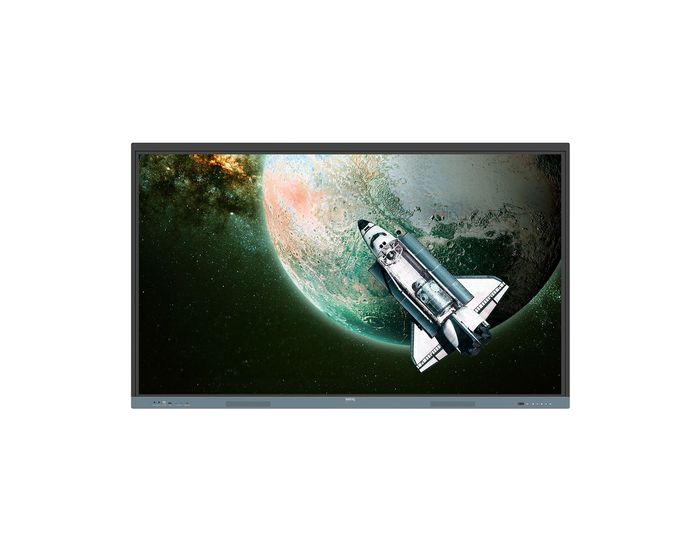
BenQ 65 Inch Interactive Display - RE6504
Harness the power of Google
The EDLA-certified BenQ Board combines Google services with ever-reliable BenQ hardware and software.
Direct file access
Google Drive integration lets you access and save files to your cloud storage directly from the board.
Built-in data security
Keep your boards safe against security and privacy threats with Google Play Protect and Safe Browsing.
A whiteboard like no other
Do more than just write or draw. EZWrite’s expandable canvas offers limitless possibilities with its rich collection of lesson tools and helpful AI features.
Use your own files
Import a variety of lesson files, interact with its contents on the whiteboard, and then export the session as an editable file for a future class.
A tool for every need
Pull up any of EZWrite’s built-in tools that are designed to engage students, and meet a wide variety of lesson activities and subjects.
Take lessons to the cloud
Extend the whiteboard so that others can participate and interact with the board whether they’re joining from their seats or from home.
Essential tools for every teacher
The RE04 uncomplicates your teaching experience by giving you everything you need on one board
Your own space and data
All accounts are secure and separate—allowing you to have your own teaching space while preventing others from accessing your data.
Organise with ease
Save time by having all your most-used apps, files, and widgets arranged and accessible directly from your home screen.
Snap. Record. Write.
The Floating Tool lets you take snapshots, record your screen, and annotate over any app, file, webpage, or video displayed on the board.
Sidebar access
Expand the sidebar for convenient access to recent apps, files, and input sources, as well as a shortcut to the home screen.
Expanded search
Use BenQ Search to quickly query related content from the internet or sort through your lessons files stored on the board or your cloud.
Enhance your lesson flow
Increase teaching efficiency with the multi-window mode, allowing you to whiteboard while using other apps on the side.
5-in-1 connectivity
The multipurpose USB-C port allows for quick data transmission, clear audio/video playback, touchback controls, and 65-watt charging.
Full vibrant audio
Experience enhanced audio with the board’s built-in 20-watt speakers that offer crisp, room-filling sound.
Everyone can share
InstaShare 2 lets everyone share ideas freely. Wirelessly cast lesson content and interact with any device from anywhere in the room.
Beyond screen sharing
Do more than just cast your screen. Media sharing makes lessons more dynamic. Share photos, videos, or even a live camera feed from your device directly to the board.
Moderate sessions with ease
Host controls allow you to effectively manage your sessions. Accept or reject sharing requests and show or hide screens, while the AI Guardian automatically blocks nude content
Management made easy
BenQ takes out the complexity from device and user list management, significantly reducing IT workload so they can focus on other tasks.
Effortless user list syncing
Simplify identity management by syncing any of your existing Google Workspace, Entra ID (formerly Azure Active Directory), ClassLink, LDAP, or SAML-based user lists.
Centralised management
Remotely manage all your BenQ devices on an all-in-one console that lets you install, update, and delete apps, push firmware updates, and automate tasks such as startup and shutdown.
Enhanced data security
Safeguard your data through the RE04’s secure login options and access controls, regular system updates, and built-in Google Play Protect and Safe Browsing measures.
Data-driven efficiency
Generate specific and comprehensive device analytics so you can monitor how your boards are being utilised and adjust usage guidelines to maximise efficiency.
School-wide announcements
With X-Sign Broadcast, you can send out timely announcements to all your BenQ displays. Inform your school about upcoming events, important reminders, and emergencies.
Easy on the eyes
Eye care technologies, such as the RE04’s low blue light filter and flicker-free screen, help reduce eye strain in class, while its anti-glare 4K screen ensures clear images every time.
IP5X dust protection
The IEC 60529-complaint RE04 screen prevents dust accumulation even in the most dust-prone environments.
Our view of the RE6504
The benq re6504 is a powerful 65-inch 4K interactive flat panel built for classrooms, boardrooms, and meeting zones where reliability and ease of use are essential. This display offers stunning Ultra HD visuals with up to 450 nits brightness and an anti-glare glass surface to ensure sharp, clear images in all lighting conditions. With its ultra-responsive infrared touch system supporting up to 40 simultaneous touch points and less than 8 ms response time, the benq 65 inch interactive display delivers fluid, natural interaction for users annotating, drawing, or collaborating. Thanks to the embedded Android 13 platform and EDLA certification, the benq 65 interactive display integrates smoothly with Google services, letting users access Google Drive, Meet, Play Store apps and content directly on the benq home screen without needing an external PC or laptop. The built-in EZWrite whiteboard tool and InstaShare 2 wireless casting technology make sharing ideas easy and intuitive. Dual 20-watt stereo speakers ensure presentations and videos sound crisp and powerful. With flexible connectivity including USB‑C with 65W power delivery, HDMI, DisplayPort, VGA, USB-A/B ports, LAN, RS‑232 and an OPS slot, the re6504 is ready for diverse installation scenarios. It’s ENERGY STAR certified, EPEAT Silver rated and designed for continuous commercial use with a 50,000-hour backlight lifespan. At approximately 36 kg and VESA mounted, it installs cleanly in teaching spaces, meeting rooms or signage walls. Whether you’re equipping schools, universities, NHS facilities or businesses, the benq re6504 combines dynamic touch interactivity, smart home‑screen access, and future‑proof usability in one elegant 65-inch display.
How we can help
To be honest there are so many screens out there it's a minefield, the specs all sound great but how do you know it works for you, well let us help. Chat to us, it might take 10 mns of your time but it could save you loads. Especially if you let us be the first bid on your behalf, we go to the manufacturers and with out high tier pricing agreements can negogiate a decent discount for you. But that only works as the first bid. If you want a demo or leasing for instance then we can also helap.
| Item | 9H.F9ETK.DE6 |
|---|---|
| Brand | BenQ |
| Weight (kg) | 36.400000 |
| Condition | New |
| EAN | 4718755093838 |
| Diagonal in Inches | 65 |
| Aspect Ratio | 16:9 |
| Built-in PC | Optional |
| Built in Android | Yes |
| Touch Technology | Infra Red |
| Touch Points | 40 |
| Resolution | 4K Ultra HD |
Delivery Charges
Delivery Info & Rates for Mainland UK (Excluding Scottish Highlands & Remote Areas)
We can offer standard delivery on most items going to UK Mainland, not including Scottish Highlands or remote areas, and standard delivery will be an all-day service either within 1-2 working days or on the specified courier's delivery date for your postcode area. Standard delivery is also kerbside only but we can sometimes offer a 2-person delivery option and timed services, please contact us if you require this or require the screen on/by a specific date.
- Standard Delivery = £25 + VAT
- Free delivery available for most accessories & smaller items
- For special services or specific delivery dates please contact us for more information.
All deliveries are sent with 3rd party couriers and must be checked for external damage before signing/accepting the delivery, and then please notify us immediately. Please also check for any internal damage or faults and notify us within 1 week of delivery to allow us to get it swapped out on a 'Dead on Arrival' basis.
Delivery Info & Rates for Non-Mainland UK, Remote Areas & International Shipping
Please contact us for quotes and information on procedure and timeframes.
About Pre-School Panels
Choosing the Right Interactive Screen for Nursery Classrooms: A Deep Dive for Early Years Educators
If you’re part of an Early Years team—whether you're leading phonics sessions, managing story time, or supporting sensory play—you already know how important the right classroom tools are. But when it comes to technology, many nursery classrooms are still making do with dated setups: dim projectors, tangled wires, whiteboards that constantly need recalibrating, and remote controls that mysteriously disappear. Sound familiar?
It’s no surprise that more and more nurseries across the UK are replacing these old systems with something faster, brighter, and easier to use: interactive flat panel displays, often called interactive TVs for nursery classrooms. These touchscreen panels are intuitive, reliable, and genuinely child-friendly—but only if you choose the right one.
At Interactive Panels UK, we’ve helped hundreds of Early Years settings make the switch, and this guide is designed to share that real-world experience—no jargon, no hard sell, just helpful advice based on what works.
Why Projectors Don’t Cut It Anymore in EYFS
Let’s start with the obvious. Projectors were a breakthrough when they first arrived in schools, but in nurseries, they’ve become more hassle than help. You’ve probably had a bulb blow in the middle of a session or found yourself adjusting blinds just to make the picture visible. And there’s the constant battle with alignment, shadows, noisy fans, and cables that turn every session into a game of dodge-the-wires.
Interactive panels, on the other hand, solve all of that. They switch on in seconds. They’re bright even in full daylight. They don’t cast shadows, and they don’t need recalibrating. They're basically giant tablets—but mounted safely and designed for groups of curious, active children.
One Early Years practitioner told us that switching to a panel felt like upgrading from a flip phone to a smartphone overnight. That’s the difference in ease, speed, and daily usability.
What to Look for in a Nursery Interactive Screen
So, what separates a good interactive screen from a great one in an Early Years environment? The first thing is usability—both for children and staff. In EYFS, you need a screen that doesn’t require complicated menus or extra equipment just to do the basics.
The best panels we’ve seen in nurseries are intuitive. Children walk up and start exploring without needing instructions. The screen recognises multiple fingers at once—so several children can interact at the same time. It’s responsive, quick, and forgiving to the slightly chaotic style of Early Years play.
You also want to consider things like screen safety. Panels designed for classroom use come with toughened, anti-glare glass, and some—like the BenQ RP series—go even further, offering anti-bacterial coatings and TÜV-certified blue light filters. These features don’t just sound good in a brochure; they make a real difference to hygiene and eye comfort in a nursery where screens might be used several times a day.
Then there’s sound. Nursery activities often involve music, movement, or story playback, so weak speakers just won’t cut it. A quality panel should have loud, clear audio—something with enough bass that songs don’t sound tinny, and enough clarity for every child to hear from across the room.
And let’s not forget about mobility. In nurseries, your screen needs to be part of a flexible space. That’s why we usually recommend a height-adjustable trolley. You can lower the panel for floor time or raise it for group songs, and easily wheel it between rooms if needed. This kind of flexibility makes it a true teaching partner, not a fixed fixture.
How Touchscreens Support Learning in EYFS
Interactive screens aren’t just fun—they support key areas of development. For instance, dragging icons and tracing letters helps build fine motor control, while audio-visual tools support early phonics and language development. A child who struggles with verbal instruction might light up when shown a visual prompt on screen.
We’ve seen this first-hand. One nursery installed a BenQ interactive panel and used it to display a visual timetable every morning. Children could see what was coming next, point to their favourite activities, and even help staff "check off" tasks with a swipe. It built routine, reduced anxiety, and encouraged participation from even the quieter pupils.
Another nursery used their panel to create a calm zone—playing gentle music and displaying calming visuals in the sensory corner. Staff reported that children gravitated toward the screen during transitions or when they needed a bit of downtime.
And during phonics? Instant access to Jolly Phonics videos, drag-and-drop sound games, and interactive books made it easier for staff to keep sessions fresh and engaging—even without advanced IT skills.
What Devices and Software Do You Need?
Here’s the good news: most modern interactive screens are designed to work with the tech you already have. Whether your nursery uses staff iPads, shared laptops, or a mix of both, the right panel will let you cast content wirelessly or connect via USB-C or HDMI.
Brands like BenQ and Promethean also come with built-in whiteboarding apps, timers, media players, and screen recording—all included in the price. That means no ongoing software subscriptions, and no need to train staff on complex systems.
If you already use specific programs—like Google Drive for planning or online phonics tools—we can help you choose a panel that plays nicely with those platforms.
Which Interactive Panel Brands Work Best in Nurseries?
Every nursery is different, but over time we’ve found some clear winners:
BenQ panels tend to be the most popular for EYFS. They’re simple to use, packed with health-focused features, and incredibly robust. Staff love them because they feel intuitive, and children love them because they’re just fun to use.
Promethean screens are another excellent choice—especially if your nursery is part of a trust or shares resources with a primary school. The whiteboard software is very teacher-friendly, and the build quality is strong.
ViewSonic panels are ideal if you need great value without compromising performance. If you’re equipping multiple rooms, they offer a solid balance of features and cost.
We’re happy to compare models with you—and we’ll explain the real differences in terms that make sense.
Installation and Aftercare
Installation matters. You want your panel set up safely, at the right height, with tidy cables and no risk to children or staff. We install interactive panels across the UK, and for nurseries, we usually recommend a mobile trolley with height adjustment to allow for maximum flexibility.
Our team handles everything—from delivery and setup to staff walkthroughs and ongoing support. We’ll also help you decide where to place the screen for best visibility, especially during group time or open play.
Want the Best Price? Here’s How It Works
There’s something called manufacturer bid pricing, and it can save your nursery a lot of money.
Here’s how it works: when you get in touch with us and request a specific panel, we log your interest with the manufacturer. If you’re the first in your area to do so, they’ll often offer us a discounted “first bid” price. We then pass that saving directly to you—no catch, no hidden costs.
This works especially well if you're looking to buy more than one screen or if you're part of a trust looking to roll out across sites.
Can You Try It First?
Yes—and we strongly recommend it.
We offer live demos online, in-person visits (depending on location), and in some cases, short-term loans of demo panels so your staff can test them out during real lessons with your children.
This helps your team feel confident and lets you see what the screen is like in action—not just in theory.
Final Thoughts
Nursery life moves fast. You need classroom tools that support your pace, not slow you down.
A well-chosen interactive panel can become part of your everyday teaching—making routines smoother, sessions more engaging, and learning more inclusive. Whether it’s modelling letter sounds, calming sensory time, or giving children a chance to share their thoughts on screen, these panels truly support learning in a way that feels natural.
At Interactive Panels UK, we know that nurseries aren’t just “smaller schools.” They have different rhythms, different challenges, and different needs. That’s why we take the time to listen, offer honest guidance, and support you from the first quote to final installation.
If you’re ready to make the switch—or just want to explore your options—we’re here to help.
- Call us on 0800 066 8150
- Email us for a personalised quote or manufacturer bid
- Book a free demo and see what fits your classroom
Let’s get started—on your terms, at your pace.
