

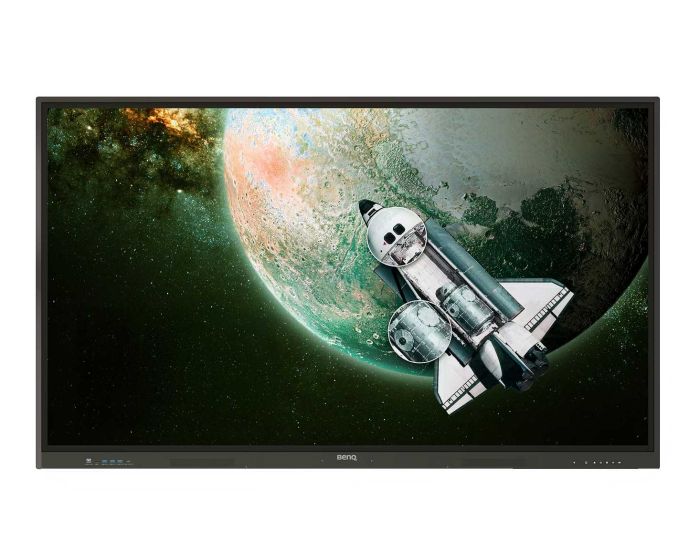
BenQ RE6504A 65" EDLA Touch Screen
What we say about it:
The BenQ RE6504A Essential Series is a 65-inch 4K UHD interactive display created to support teachers and students in today’s digital classrooms. With responsive multi-touch technology, it allows students to engage directly with lessons, making learning more interactive and collaborative. The built-in Android system includes annotation, whiteboarding, and wireless screen sharing tools, helping teachers deliver dynamic content quickly and effectively. Designed with education in mind, it features a germ-resistant screen for safer classroom use and eye-care technology for student wellbeing. Easy to use, durable, and reliable, the RE6504A makes lessons more engaging while supporting modern teaching methods.
What BenQ say about it:
Looking for an all-in-one display that truly does it all? The BenQ Board Essential combines ease of use with powerful features and Android 14, making it the perfect tool to engage students and empower you to teach your way.
Everything you need in one display
Powerful and intuitive, the Google-certified BenQ Board Essential RE04A equips you with all the tools you need for better lessons.
Expansive app library
Install education apps directly from Google Play for more interactive lessons.
Go-to Google services
Access essential Google Core Services such as Google Drive and Meet.
Enhance lessons with AI tools
Built-in AI tools, including handwriting recognition, optical character recognition, translation, and AI Guardian not only enrich lessons, they also make classes safer and more accessible.
Your data, kept secure
Your data is safe thanks to Google Play Protect and Safe Browsing on the BenQ Board RE04A. BenQ Board services also comply with stringent security protocols including GDPR and CCPA for enhanced protection.
A whiteboard like no other
Do more than just write or draw. EZWrite’s expandable canvas offers limitless possibilities with its rich collection of lesson tools and helpful AI features.
Ensure continuous learning
Multiple ways to export and import lessons allow you to save your class progress and continue where you left off.
Expansive and fully equipped
An expandable canvas and a wide variety of multi-purpose teaching features ensure that you never run out of space or tools while teaching.
Widen the reach of your classroom
Cloud whiteboarding lets you extend your lessons beyond your classroom, allowing remote students to participate from wherever they are.
Snap. Record. Write.
The Floating Tool lets you take snapshots, record your screen, and annotate over any app, file, webpage, or video displayed on the board.
Sidebar access
Expand the sidebar for convenient access to recent apps, files, and input sources, as well as a shortcut to the home screen.
Expanded search
Use BenQ Search to quickly query related content from the internet or search through your lessons files stored on the board or your cloud drives.
Use the devices you want
Multiple ports and wireless connectivity let you freely use the BenQ Board RE04A with your laptop or other input and output devices.
Ready for media playback
The 4K UHD screen paired with two 20-watt speakers lets you play multimedia content without needing extra peripherals.
40 touch points
Get everyone actively participating in class with the RE04A’s 40 touch points.
Gap-free writing
No gaps and a <5 ms response time ensure a natural writing experience every time.
Precise touch
You’re guaranteed smooth interactions with the board’s Precision IR technology.
Share from any device
Wirelessly share up to 4 screens directly from your Chromebook, Windows laptop, MacBook®, iPad®, iPhone®, or any Android phone or tablet.
*MacBook®, iPad®, and iPhone® are trademarks of Apple Inc.
Share all kinds of content
Duplicate or extend your device screen, share a single window, or media files, including PDFs, images, and videos.
Your AI content moderator
The built-in AI Guardian automatically blocks inappropriate images and videos from being cast to the screen to keep lessons running smoothly.
Remotely manage and monitor
Our centralized cloud management portal lets you push firmware updates, configure settings, and apply policies while giving you comprehensive device analytics.
Enhanced data security
Safeguard your data through the RE04A’s secure login options and access controls, regular system updates, and built-in Google Play Protect and Safe Browsing measures.
Keep everyone up to date
Send real-time messages with sound, play media, or broadcast a live video feed to all or a select group of BenQ Boards in your school with X-Sign Broadcast.
IP5X dust protection
The RE04A’s IEC 60529-compliant screen prevents the accumulation of dust even in the most dust-prone environments.
| Item | 9H.FAMTK.DE4 |
|---|---|
| Brand | BenQ |
| Weight (kg) | 36.600000 |
| Condition | New |
| EAN | 4718755095078 |
| Diagonal in Inches | 65 |
| Aspect Ratio | 16:9 |
| Orientation | Landscape Only |
| Built-in PC | Optional |
| Built in Android | Yes |
| Touch Technology | Infra Red |
| Touch Points | 40 |
| Resolution | 4K Ultra HD |
Delivery Charges
Delivery Info & Rates for Mainland UK (Excluding Scottish Highlands & Remote Areas)
We can offer standard delivery on most items going to UK Mainland, not including Scottish Highlands or remote areas, and standard delivery will be an all-day service either within 1-2 working days or on the specified courier's delivery date for your postcode area. Standard delivery is also kerbside only but we can sometimes offer a 2-person delivery option and timed services, please contact us if you require this or require the screen on/by a specific date.
- Standard Delivery = £25 + VAT
- Free delivery available for most accessories & smaller items
- For special services or specific delivery dates please contact us for more information.
All deliveries are sent with 3rd party couriers and must be checked for external damage before signing/accepting the delivery, and then please notify us immediately. Please also check for any internal damage or faults and notify us within 1 week of delivery to allow us to get it swapped out on a 'Dead on Arrival' basis.
Delivery Info & Rates for Non-Mainland UK, Remote Areas & International Shipping
Please contact us for quotes and information on procedure and timeframes.
About 50-69 Inch Touch screen displays
Investing in new technology for your school, business, or organisation is never a small decision. A 65 inch touchscreen isn’t just a piece of equipment—it’s a commitment to the way you teach, work, and communicate for years to come. Many of our customers feel the same hesitation at first: is it worth it, and will it really make a difference? But what we hear time and again after installation is that they wish they had made the move sooner.
The truth is, every month you delay upgrading means more money wasted on replacing projector bulbs, fixing breakdowns, or dealing with technology that frustrates staff and students. Projectors might look cheaper at first, but the hidden costs pile up—and in the meantime, learning and meetings suffer. By contrast, a 65 inch interactive display is designed to last. With bright 4K clarity, anti-glare glass, and long-life panels, you don’t just save on repairs—you invest in something that will deliver reliable performance year after year.
And let’s be honest—it simply looks better. A slimline 65 inch touchscreen mounted cleanly on the wall creates an impressive, modern focal point in any classroom, meeting room, or training space. There are no hanging projectors, no tangle of cables, no dimmed lights or shadows on the screen. Instead, you get a crisp, vibrant display that instantly lifts the room, makes presentations more professional, and gives your space the kind of polish that both staff and visitors notice.
Here’s something we see often when people browse our range: two 65 inch touchscreens might look the same at first glance, but the specs tell a different story. One panel might only offer 20 points of touch, while another supports 40—making a huge difference when several students or colleagues want to interact at the same time. Some models include integrated Android systems with instant whiteboarding and wireless casting, while others need an external device to do the same job. Even the brightness levels can vary, with one screen struggling in daylight and another delivering clear, vibrant images no matter the lighting. These differences might not stand out in the spec sheet at first, but in real-world use they decide whether a screen becomes a tool you love—or one that quickly frustrates. That’s where we step in, to help you compare properly and choose the one that will really meet your needs.
There’s another reason not to wait: prices and availability can shift. Manufacturers update models regularly, and special bid pricing or discounts are often only available if your project is registered early. Acting now secures today’s technology and today’s savings.
The real value, though, goes beyond cost and appearance. Imagine a classroom where every student can see clearly, where lessons are interactive rather than passive, and where teachers have the confidence to use tools that respond instantly to their touch. Picture a business meeting where colleagues stop fiddling with cables, where ideas are shared on the screen in seconds, and where hybrid participants feel every bit as present as those in the room. These are the moments when the technology becomes invisible—when the screen simply becomes the space where collaboration happens. That’s what a 65 inch touch screen delivers, and every day you wait is a day those benefits are missing from your environment.
We understand it’s a big decision, which is why we make it easier. From helping you choose between leading brands like Clevertouch, ViewSonic, or Vestel, to arranging a live demo so you can try before you commit, we ensure you’re confident in your choice. We also offer leasing options to spread the cost, bulk-buy discounts for multi-room rollouts, and manufacturer-backed bid pricing when projects are registered early—unlocking savings that won’t be there later.
Our customers often describe their 65 inch touchscreens as not just tools, but assets they’ve grown to love. They notice how the design fits seamlessly into the room, how the responsiveness encourages interaction, and how the technology supports them every single day. Whether it’s a teacher who no longer has to dim the lights for a projector, or a business team who can finally run hybrid meetings without frustration, the sense of relief and satisfaction is real.
The time to act is now. Don’t let another term, another meeting cycle, or another budget year pass by with outdated technology holding you back. Call us today on 0800 066 8150 or use our contact form to book a demo. Secure your savings, lock in the best pricing, and start experiencing the difference a 65 inch touchscreen can make—before you fall further behind.
Other suitable alternatives
-
 In Stock 91£1,431.07 £1,192.56iiyama TE6512MIS-B4AG 65" Touch ScreenIn stockBuilt-in PC OptionalCondition NewBuilt in Android YesOrientation Landscape OnlyResolution 4K Ultra HDTouch Points 40Touch Technology PureTouch-IRDiagonal in Inches 65Aspect Ratio 16:9Weight (kg) 28.50
 -
 In Stock 24£1,406.40 £1,172.00Clevertouch X5 65" Touch ScreenIn stockBuilt-in PC OptionalCondition NewBuilt in Android YesResolution 4K Ultra HDTouch Points 40Touch Technology High Precision TechnologyDiagonal in Inches 65Aspect Ratio 16:9Weight (kg) 36.15