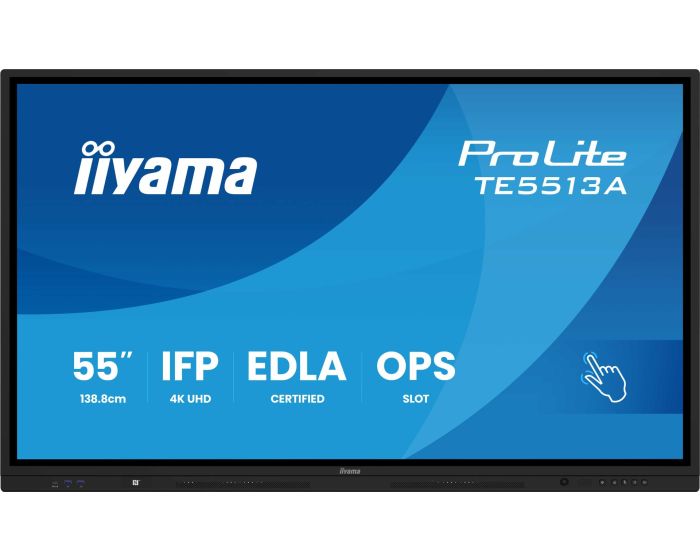
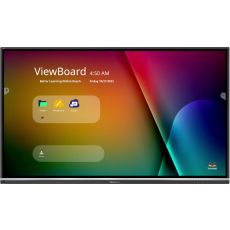
iiyama TE5513A-B1AG 55" Touch Screen
What we say about it:
The iiyama TE5513A-B1AG is a 55-inch 4K UHD interactive touchscreen designed for professional and educational environments. Featuring responsive multi-touch technology, an intuitive Android EDLA operating system, and built-in collaboration tools, it’s perfect for classrooms, training spaces, and meeting rooms. With crystal-clear visuals, smooth touch performance, and versatile connectivity, the TE5513A-B1AG delivers a seamless interactive experience for engaging lessons and productive meetings.
What iiyama say about it:
Google EDLA Certified
Google Enterprise Device License Agreement allows Google apps, accounts, files, and collaborative tools to be easily accessed directly from the Google EDLA certified iiyama displays, offering seamless integration with the Google ecosystem and the entire Microsoft 365 suite for enhanced user experience, productivity, and collaboration in all environments, especially the education and enterprise sectors alike.
iiWare 21E (Android 14 OS)
Empower your presentations with iiWare 21E, featuring Google EDLA, iiControl (DMS), iiShare (Wireless Presentation), WhiteBoard, Cloud Drives, iiBrowser and file manager via an intuitive and user-friendly software that allows you to effortlessly manage, customize, and access various applications with ease.
Quick Radial Menu
This feature provides a quick way to operate the interactive display. Long press with five fingers to bring up the Quick Radial Menu. Users can directly select the frequently used apps in the apps menu and place them in the Quick Radial Menu.
iiControl - Device Management System
iiControl provides organizations with a convenient and fast unified management solution for terminal equipment, builds an efficient and real-time equipment management system, helps digitize the campus/office estate environment and makes device management ultra convenient. iiControl DMS is committed to maintaining compliance with GDPR.
PureTouch-IR+
The state-of-the-art PureTouch-IR+ technology ensures accurate and precise touch responses, enabling effortless interaction and annotation.
PIR Motion Sensor
The PIR motion sensor enhances energy efficiency by detecting movement and automatically adjusting display settings. It reduces power consumption when no activity is detected, extending device lifespan. Ideal for offices and classrooms, it ensures a smart, hands-free operation while optimizing performance and sustainability.
Standalone Solution & Connectivity
The OPS PC Slot offers a convenient standalone solution, allowing easy integration without the need for additional devices. The USB-C connection provides seamless connectivity, enabling quick data transfer, video output, and power through a single cable for enhanced versatility and ease of use.
Wall Mount
The included wall mount bracket ensures secure and stable installation of your display. Designed for easy setup, it supports VESA compatibility and offers a sleek, space-saving solution. Its durable construction guarantees reliability, making it ideal for classrooms, offices, and meeting rooms.
Speakers, Subwoofer and Webcam Bracket
The built-in front-facing speakers with an integrated subwoofer support conferencing configurations with ultra clear sound. The included webcam bracket ensures secure and stable installation of a webcam. Ideal for conferencing, presentations, and interactive applications.
| Item | TE5513A-B1AG |
|---|---|
| Brand | iiyama |
| Weight (kg) | 28.700000 |
| Condition | New |
| EAN | 4948570124794 |
| Diagonal in Inches | 55 |
| Aspect Ratio | 16:9 |
| Orientation | Landscape Only |
| Built-in PC | Optional |
| Built in Android | Yes |
| Touch Technology | PureTouch-IR+ |
| Touch Points | 40 |
| Resolution | 4K Ultra HD |
Delivery Charges
Delivery Info & Rates for Mainland UK (Excluding Scottish Highlands & Remote Areas)
We can offer standard delivery on most items going to UK Mainland, not including Scottish Highlands or remote areas, and standard delivery will be an all-day service either within 1-2 working days or on the specified courier's delivery date for your postcode area. Standard delivery is also kerbside only but we can sometimes offer a 2-person delivery option and timed services, please contact us if you require this or require the screen on/by a specific date.
- Standard Delivery = £25 + VAT
- Free delivery available for most accessories & smaller items
- For special services or specific delivery dates please contact us for more information.
All deliveries are sent with 3rd party couriers and must be checked for external damage before signing/accepting the delivery, and then please notify us immediately. Please also check for any internal damage or faults and notify us within 1 week of delivery to allow us to get it swapped out on a 'Dead on Arrival' basis.
Delivery Info & Rates for Non-Mainland UK, Remote Areas & International Shipping
Please contact us for quotes and information on procedure and timeframes.
About iiyama
How to Choose the Right iiyama Touchscreen
Whether you’re upgrading tired projectors, replacing interactive whiteboards, or looking to modernise your training and presentation spaces, iiyama touchscreens give you a smart, scalable solution that works from day one. Follow these steps to make sure you choose the right screen—and get the best return on your investment.
-
Define the Purpose of the Screen
Start by identifying where and how the screen will be used. For education: is it for a primary classroom, a sixth form seminar room, or a SEND space? For business: will it be used in boardrooms, training sessions, or reception areas? The environment and users will determine what level of size, durability, and functionality you need. -
Match the Screen Size to the Room
Choosing the right size ensures visibility and engagement. 24"–65" screens suit smaller rooms, prep areas, and flexible-use classrooms. 65"–86" screens are ideal for standard or large classrooms, sixth forms, and boardrooms. A larger screen reduces eye strain and encourages participation from every seat. -
Decide on Mobility or Fixed Installation
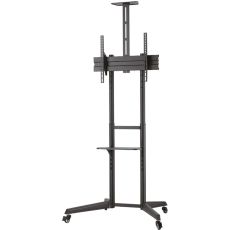
Fixed wall-mounted screens are great for permanent, high-traffic classrooms and meeting spaces. Mobile trolleys are perfect for shared rooms, SEND provision, or flexible-use training environments. We provide safe, professional mounting options to suit any layout, including floor stands and adjustable brackets. -
Choose Your iiyama Model - these models might change - but check our website for the latest ones
ProLite TE8614MIS-B2AG (86"): Ideal for sixth form classrooms and collaborative spaces. 50-point multi-touch with PureTouch-IR+ for high accuracy. Zero Airgap LCD for seamless writing and visual clarity. Android 13 with iiWare 12E and USB-C for charging, video, audio, and touch.
ProLite TE6515A-B1AG (65"): Tailored for primary classrooms. DeepContrast-IR+ with 40-point multi-touch and palm rejection. Optical bonding to reduce glare and improve accuracy. Integrated Wi-Fi 6 and Bluetooth 5.0. Clean, safe design with pen holders and quality audio.
ProLite TE6504MIS-B2AG (65"): Cost-effective and reliable for schools upgrading from older tech. PureTouch-IR with 1mm accuracy and 20-point touch. Android with iiWare 9.0 preloaded. Robust build with hardened glass and metal bezel. USB-C for simple plug-and-play setup with any laptop.
ProLite TE7515MIS-B1AG (75"): Made for professional business environments. Elegant frameless design, strong audio, and accurate touch. Android 13 and iiWare 12E for built-in collaboration apps. A smart upgrade for presentation rooms or digital whiteboards.
ProLite T2455MSC-B1 (24"): Compact, accurate, and ideal for staff spaces. 10-point PCAP touch with Full HD IPS display. Nano coating for easier cleaning and fewer smudges. Built-in webcam and mic for hybrid working. Ideal for reception desks, teacher prep rooms, and interactive control stations. -
Check Connectivity & Compatibility
Do you need USB-C support for charging and video from a single cable? Will the user rely on built-in Android apps like browser, note, and cloud tools—or external devices? iiyama screens work seamlessly with Windows, Mac, Chromebooks, and Android devices. -
Consider Mounting and Accessibility
We offer wall-mounted solutions for fixed teaching environments, mobile touchscreen trolleys for schools and shared training spaces, and height-adjustable floor stands for accessibility and flexibility. Our team can recommend the best hardware for your room and safety requirements. -
Request Tailored Bid Pricing
Schools, trusts, MATs, training providers, and business clients are eligible for discounted bid pricing. Whether you’re installing one screen or 100, we’ll help you get the best value—without sacrificing features. Multi-unit quotes and phased rollouts? No problem. -
Book a Demo
See iiyama in action before you buy. Our team will walk you through model differences, mounting options, integration with your devices and systems. Then we’ll prepare a fully tailored quote.
Why iiyama?
Trusted brand across UK education and enterprise. Five-year on-site warranty and full UK support. Wall-mounted or mobile setup options. Optional installation service available at an additional cost. Android OS, USB-C, and 4K clarity across the range.
Don’t settle for outdated tech. Choose an iiyama touchscreen—designed for how schools and businesses work today. Book your demo. Request a quote. And let us help you get the right screen in the right space.