

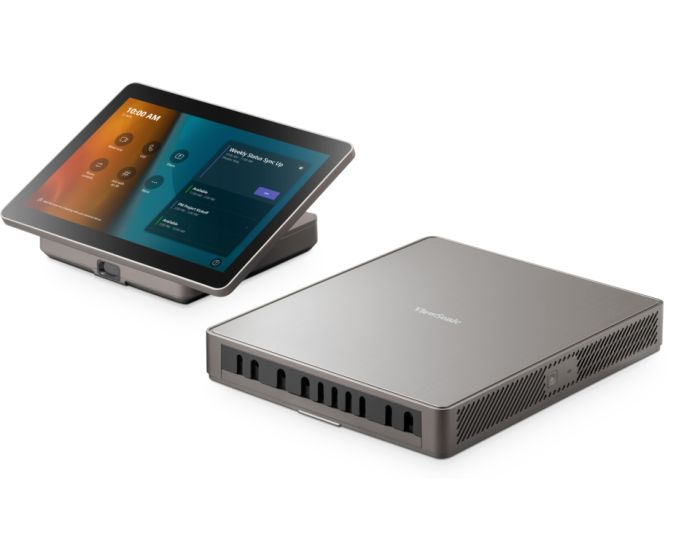
ViewSonic TeamJoin TRS10
Designed to deliver instant and intuitive collaboration without a complicated setup, ViewSonic® TeamJoin™ solutions for Microsoft Teams Rooms enhance communication, foster collaboration, and promote inclusivity for teams of all sizes, regardless of location. The TeamJoin™ TRS10 bundle, featuring a Computing Engine (MPC310-W31-TU) and Touch Console (MRC1010-TN), offers a complete, one-stop solution that can easily scale to meet your needs and adapt to any meeting space size.
Easy-to-Deploy Microsoft Teams Rooms Solution
Featuring a nimble Computing Engine and intuitive Touch Console, the TRS10 bundle simplifies deployment and enables instant collaboration in meeting rooms of any size. Tailored for those seeking a reliable, secure, and cost-effective Microsoft Teams Rooms experience, this solution ensures seamless communication.
Enterprise-grade Security
An integrated Trusted Platform Module (TPM) 2.0 ensures safer, more secure computing with hardware-based authentication and tamper detection. Additionally, the 12th generation Intel processor delivers advanced security features, including Intel Threat Detection Technology and Control-Flow Enforcement. These are further complemented by the Windows 11 IoT Enterprise operating system with Smart App Control (SAC), enhancing overall device security.
Seamless Collaboration Control Hub
The MPC310-W31-TU TeamJoin Computing Engine powered by a 12th Gen Intel® Core™ processor, optimises hybrid collaboration. With built-in Microsoft Teams Rooms software on the latest Windows 11 IoT Enterprise, it facilitates easy connection, content sharing, and collaboration in calls and meetings. The integrated cable management streamlines the setup, simplifying maintenance for IT staff.
Full Meeting Control at Your Fingertips
Enjoy intuitive touch control with the MRC1010-TN TeamJoin Touch Console. Featuring Direct HDMI Ingest connectivity for BYOD presentations, this 10.1” Full HD anti-glare touch display offers an easy-to-use Microsoft Teams interface that allows you to start, join and manage meetings—all from your fingertips.
Start Meetings with a Simple Move
The MRC1010-TN TeamJoin Touch Console automatically activates the computing engine and ViewSonic display upon detecting human presence, ensuring the meeting is ready to start the moment you are.
| Item | TRS10 |
|---|---|
| Weight (kg) | 1.860000 |
| Brand | ViewSonic |
| EAN | 0766907027761 |
Delivery Charges
Delivery Info & Rates for Mainland UK (Excluding Scottish Highlands & Remote Areas)
We can offer standard delivery on most items going to UK Mainland, not including Scottish Highlands or remote areas, and standard delivery will be an all-day service either within 1-2 working days or on the specified courier's delivery date for your postcode area. Standard delivery is also kerbside only but we can sometimes offer a 2-person delivery option and timed services, please contact us if you require this or require the screen on/by a specific date.
- Standard Delivery = £25 + VAT
- Free delivery available for most accessories & smaller items
- For special services or specific delivery dates please contact us for more information.
All deliveries are sent with 3rd party couriers and must be checked for external damage before signing/accepting the delivery, and then please notify us immediately. Please also check for any internal damage or faults and notify us within 1 week of delivery to allow us to get it swapped out on a 'Dead on Arrival' basis.
Delivery Info & Rates for Non-Mainland UK, Remote Areas & International Shipping
Please contact us for quotes and information on procedure and timeframes.
About Video Conferencing
Video conferencing has come a long way from the early days of grainy video, clunky hardware, and costly dedicated lines. Today, interactive video conferencing is fast, reliable, and accessible on almost any device—but for professional results in schools, businesses, or public-sector spaces, investing in the right video conferencing equipment is essential. Modern interactive video conferencing goes far beyond a simple video call. It combines live audio and video with real-time collaboration tools such as screen sharing, digital whiteboarding, and wireless casting. For schools, this means interactive lessons where teachers and students can annotate documents together, connect with remote classrooms, or bring subject experts into the room virtually. For businesses, it creates meeting spaces where teams can brainstorm, present, and make decisions quickly, whether participants are in the room or across the globe.
At the heart of every setup is the video conferencing equipment. This typically includes high-resolution cameras, high-fidelity microphones, and integrated speakers. In small classrooms or huddle rooms, an all-in-one unit may be enough, while larger lecture halls or boardrooms may require PTZ cameras for wide coverage, multiple microphones, and ceiling-mounted speakers. The right choice depends on room size, number of participants, and the platforms you already use, such as Zoom, Microsoft Teams, or Google Meet. Video conferencing accessories make systems more flexible and effective. Soundbars improve clarity, extra microphones ensure every voice is heard, and wireless presentation devices enable quick content sharing. Touch-enabled displays bring lessons and meetings to life with real-time interaction. For schools, height-adjustable trolleys ensure accessibility for all students, while businesses may opt for echo-cancelling microphones or secure content-sharing dongles for professional, frustration-free meetings.
For those wanting an out-of-the-box solution, video conferencing kits offer everything in one package: camera, microphone, speaker, and software integration. Schools often prefer kits for their simplicity and reliability, while businesses may choose modular options that allow accessories or upgrades to be added later. Kits are an affordable and efficient way to start building your setup without technical headaches. A full video conferencing system integrates hardware, software, and networking into a unified setup tailored to your needs. A school might want linked classrooms integrated with its learning management platform, while a business may require a system that ties seamlessly into Microsoft Teams or Google Workspace to support hybrid working. A well-designed system reduces IT involvement, keeps things simple for users, and ensures maximum engagement.
Robust video conferencing hardware is the backbone of any reliable setup. Today’s cameras offer 4K resolution and auto-framing, microphones use AI-driven noise cancellation, and displays feature touch interactivity for collaboration. The hardware chosen must match the environment—what works for a small office won’t meet the demands of a 100-seat lecture theatre. With the right hardware, schools and businesses enjoy smooth, disruption-free conferencing every time.
How to Choose the Right Setup
When selecting your video conferencing solution, there are several stages to consider. The size and layout of your space will shape whether you need a compact all-in-one kit, or a full system with multiple microphones and cameras. You’ll also want to think about how many participants will typically join, and whether the system is being used for education, business, healthcare, or government environments.
Integration is another key factor—your setup should connect seamlessly with the platforms you already use, such as Microsoft Teams, Zoom, or Google Meet, and work easily with existing devices. Finally, decide how much interactivity is required. For schools, this often means prioritising ease of use, accessibility for all learners, and interactive tools that keep students engaged. For businesses, it’s about enhancing professionalism, supporting hybrid working, and reducing travel costs without sacrificing collaboration quality.
An example Case Study
One school modernised its classrooms by replacing outdated projectors with a full video conferencing system built around a 4K interactive display, wide-angle camera, and advanced microphone array. To ensure flexibility, they added video conferencing accessories such as wireless casting devices and mobile trolleys. Teachers could instantly connect with guest speakers, annotate live on documents, and engage SEND students directly. IT staff reported fewer support tickets, and the school saved money by accessing manufacturer bid pricing through us, with costs spread over a leasing plan. Engagement levels rose dramatically, proving how the right video conferencing kit can transform learning.
Why Work With Interactive Panels UK
At Interactive Panels UK, we don’t just sell boxes—we deliver complete solutions. Whether you need a simple all-in-one video conferencing kit for a small classroom or a full interactive video conferencing system for a multi-site business, we have the expertise to design, install, and support it. With options for leasing, bulk-buy discounts, demos, and special bid pricing from manufacturers, we make the best technology affordable and accessible.
Now is the time to upgrade your learning or meeting space. Call us today on 0800 066 8150 or use our contact form to book a demo, request a tailored quote, or speak to one of our specialists about building the right video conferencing solution for you.
