

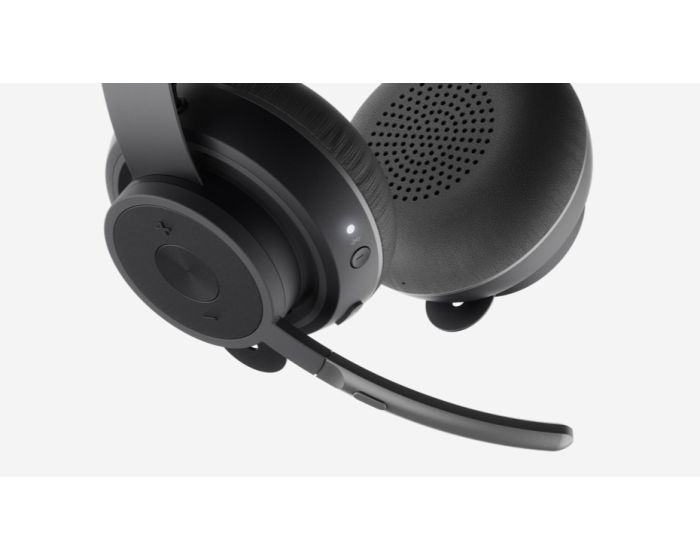
Logitech Zone Wireless Headset

LOGITECH ZONE WIRELESS
Bluetooth headset designed for the open office with exceptional sound, flip-to-mute mic, and Qi wireless charging.
ELEVATE YOUR OPEN OFFICE EXPERIENCE
Open workspaces are great for collaboration, but they can also be noisy. Take control of your acoustic environment with Zone Wireless, the Bluetooth® headset specifically designed for busy workspaces. Equally awesome for talking and music. Universal compatibility ensures easy setup. Connects to smartphone and computer simultaneously and features simple controls, flip-to-mute mic and Qi charging.
GET FOCUSED. STAY FOCUSED
Open workspaces are great for collaboration, but not so great when the conversations around you make it hard to concentrate. With active noise cancellation that reduces unwanted ambient sound, a Zone Wireless headset can help you focus on the task at hand and get more stuff done. Think of it as a personal portal to acoustic serenity amidst a sea of otherwise distracting noise. Same workspace, but with a sound experience that you control.
GREAT FOR MUSIC AND TALKING
Treat yourself to immersive sound when listening to music. Logitech audio engineers have been fine-tuning headset audio for decades, and the results are amazingly clear when you experience your own music with Zone Wireless. For phone chats and conference calls, the noise-canceling mic isolates your voice from the noise around you for clearer conversations and a sidetone control helps you modulate the volume of your voice to just the right level.
CERTIFIED FOR MICROSOFT TEAMS
Launch a Microsoft® Teams meeting and pick-up or answer a Teams call with a single touch. Or apply a longer touch to invoke Cortana® voice skills. It’s that simple. Zone Wireless is Teams-certified and Teams 4.0 compliant to ensure a seamless audio experience when using Teams to chat, meet, call or video conference. The Teams version of Zone Wireless also fully supports Skype® for Business.
SIMPLE CONTROLS. EASY TO USE
Zone Wireless provides an intuitive and simple interface to adjust volume, play/pause music1, and start/end calls. The mic boom features a flip-to-mute function, plus button controls provide easy access to power, active noise cancellation, and wireless Bluetooth pairing. Zone Wireless supports wireless Qi charging2 and includes a mobile companion app that supports easy setup and simple control for headset functions like sidetone modulation and EQ presets.
ALL-DAY COMFORT
Zone Wireless is designed for office use all day, every day. The silicone-padded headband is lightweight and provides just the right clamping force for a fit that’s so comfortable you might forget you’re wearing a high-performance headset. Soft leatherette ear pads are cushiony and breathable, so your ears don’t get hot. Zone Wireless blocks sound from the moment you put it on, and the foldable design makes it handy to stow when you take the headset off.
CONNECT MULTIPLE DEVICES
Designed for mobile workers, Zone Wireless provides the versatility to wirelessly connect to your computer, tablet, and smartphone simultaneously and seamlessly switch between connected devices at will. The 30 m wireless range provides freedom to roam while staying connected. Transition between phone chats, video conferencing, music, and general noise reduction throughout your day—all with the same headset and happy-making acoustic performance.
FULL CONTROL WITH LOGI TUNE
Open the Logi Tune mobile app on your smartphone or Tune Desktop on your computer to easily setup, control, and customize your Zone Wireless headset. From the elegantly intuitive dashboard, confidently manage mute, view charging status, modulate sidetone controls, and tweak the 5-band EQ sliders (or choose one of the custom presets). Keep your headset up-to-date by downloading the latest software from either the mobile or desktop app.
READY FOR BUSINESS
Universally compatible to work with common calling applications across most all platforms and operating systems. Business certifications include Microsoft Teams and Skype for Business, certified for Google Voice™, compatible with integrated mute controls for Zoom™, and works with other popular applications like Cisco Jabber™, BlueJeans, and GoToMeeting™ to ensure compatibility and seamless integration in the workplace.
| Item | 981-000798 |
|---|---|
| Weight (kg) | 0.180800 |
| EAN | 5099206083332 |
| Bluetooth | Yes |
| Wireless Charging | Yes |
| Mobile App | Yes |
| Noise Cancelling | Yes (Active) |
| Short Description | 2-Year Limited Hardware Warranty |
Delivery Charges
Delivery Info & Rates for Mainland UK (Excluding Scottish Highlands & Remote Areas)
We can offer standard delivery on most items going to UK Mainland, not including Scottish Highlands or remote areas, and standard delivery will be an all-day service either within 1-2 working days or on the specified courier's delivery date for your postcode area. Standard delivery is also kerbside only but we can sometimes offer a 2-person delivery option and timed services, please contact us if you require this or require the screen on/by a specific date.
- Standard Delivery = £25 + VAT
- Free delivery available for most accessories & smaller items
- For special services or specific delivery dates please contact us for more information.
All deliveries are sent with 3rd party couriers and must be checked for external damage before signing/accepting the delivery, and then please notify us immediately. Please also check for any internal damage or faults and notify us within 1 week of delivery to allow us to get it swapped out on a 'Dead on Arrival' basis.
Delivery Info & Rates for Non-Mainland UK, Remote Areas & International Shipping
Please contact us for quotes and information on procedure and timeframes.
About Video Conferencing
Video conferencing has come a long way from the early days of grainy video, clunky hardware, and costly dedicated lines. Today, interactive video conferencing is fast, reliable, and accessible on almost any device—but for professional results in schools, businesses, or public-sector spaces, investing in the right video conferencing equipment is essential. Modern interactive video conferencing goes far beyond a simple video call. It combines live audio and video with real-time collaboration tools such as screen sharing, digital whiteboarding, and wireless casting. For schools, this means interactive lessons where teachers and students can annotate documents together, connect with remote classrooms, or bring subject experts into the room virtually. For businesses, it creates meeting spaces where teams can brainstorm, present, and make decisions quickly, whether participants are in the room or across the globe.
At the heart of every setup is the video conferencing equipment. This typically includes high-resolution cameras, high-fidelity microphones, and integrated speakers. In small classrooms or huddle rooms, an all-in-one unit may be enough, while larger lecture halls or boardrooms may require PTZ cameras for wide coverage, multiple microphones, and ceiling-mounted speakers. The right choice depends on room size, number of participants, and the platforms you already use, such as Zoom, Microsoft Teams, or Google Meet. Video conferencing accessories make systems more flexible and effective. Soundbars improve clarity, extra microphones ensure every voice is heard, and wireless presentation devices enable quick content sharing. Touch-enabled displays bring lessons and meetings to life with real-time interaction. For schools, height-adjustable trolleys ensure accessibility for all students, while businesses may opt for echo-cancelling microphones or secure content-sharing dongles for professional, frustration-free meetings.
For those wanting an out-of-the-box solution, video conferencing kits offer everything in one package: camera, microphone, speaker, and software integration. Schools often prefer kits for their simplicity and reliability, while businesses may choose modular options that allow accessories or upgrades to be added later. Kits are an affordable and efficient way to start building your setup without technical headaches. A full video conferencing system integrates hardware, software, and networking into a unified setup tailored to your needs. A school might want linked classrooms integrated with its learning management platform, while a business may require a system that ties seamlessly into Microsoft Teams or Google Workspace to support hybrid working. A well-designed system reduces IT involvement, keeps things simple for users, and ensures maximum engagement.
Robust video conferencing hardware is the backbone of any reliable setup. Today’s cameras offer 4K resolution and auto-framing, microphones use AI-driven noise cancellation, and displays feature touch interactivity for collaboration. The hardware chosen must match the environment—what works for a small office won’t meet the demands of a 100-seat lecture theatre. With the right hardware, schools and businesses enjoy smooth, disruption-free conferencing every time.
How to Choose the Right Setup
When selecting your video conferencing solution, there are several stages to consider. The size and layout of your space will shape whether you need a compact all-in-one kit, or a full system with multiple microphones and cameras. You’ll also want to think about how many participants will typically join, and whether the system is being used for education, business, healthcare, or government environments.
Integration is another key factor—your setup should connect seamlessly with the platforms you already use, such as Microsoft Teams, Zoom, or Google Meet, and work easily with existing devices. Finally, decide how much interactivity is required. For schools, this often means prioritising ease of use, accessibility for all learners, and interactive tools that keep students engaged. For businesses, it’s about enhancing professionalism, supporting hybrid working, and reducing travel costs without sacrificing collaboration quality.
An example Case Study
One school modernised its classrooms by replacing outdated projectors with a full video conferencing system built around a 4K interactive display, wide-angle camera, and advanced microphone array. To ensure flexibility, they added video conferencing accessories such as wireless casting devices and mobile trolleys. Teachers could instantly connect with guest speakers, annotate live on documents, and engage SEND students directly. IT staff reported fewer support tickets, and the school saved money by accessing manufacturer bid pricing through us, with costs spread over a leasing plan. Engagement levels rose dramatically, proving how the right video conferencing kit can transform learning.
Why Work With Interactive Panels UK
At Interactive Panels UK, we don’t just sell boxes—we deliver complete solutions. Whether you need a simple all-in-one video conferencing kit for a small classroom or a full interactive video conferencing system for a multi-site business, we have the expertise to design, install, and support it. With options for leasing, bulk-buy discounts, demos, and special bid pricing from manufacturers, we make the best technology affordable and accessible.
Now is the time to upgrade your learning or meeting space. Call us today on 0800 066 8150 or use our contact form to book a demo, request a tailored quote, or speak to one of our specialists about building the right video conferencing solution for you.
