

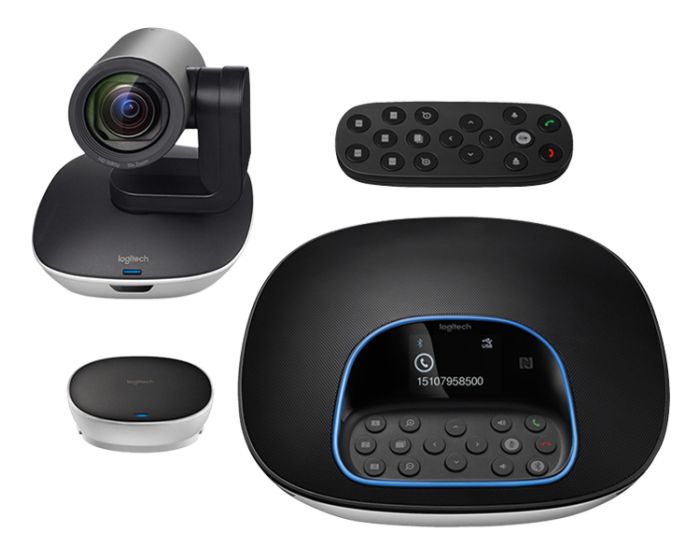
Logitech GROUP Video Conferencing System
PERFECT FOR LARGER ROOMS
GROUP, our video conferencing solution for rooms that seat 14–20 people, delivers high quality HD video and crystal clear audio, allowing any meeting place to be a video conferencing space. With advanced features like acoustic echo cancellation, noise reduction technology, and intuitive controls, it’s easier than ever to include everyone in the conversation.
PLUG-AND-PLAY SIMPLICITY
USB plug-and-play connectivity makes GROUP a breeze to deploy and use. Simply connect GROUP the conference room computer or your laptop through USB, and you’re good to go. Use GROUP with any video conferencing software, including those you already use. For great-sounding audio calls, pair your mobile device with Bluetooth® wireless technology to the GROUP speakerphone.
OPTIONS GIVE YOU VERSATILITY
Customize the setup to match the layout and size of your room. Mount the camera on a table, tripod, or wall. Optional expansion mics extend audio coverage up to 28 feet (8.5 meters). Add an optional 33 feet (10 meter) or 49 feet (15 meter) cable to increase the reach of the speakerphone or camera.
HIGH-DEFINITION VIDEO
Bring meetings into focus with GROUP’s premium lens, 10x lossless zoom, and HD 1080p/30 performance. Perfectly frame presenters and whiteboards with pan/tilt control, and zoom in for detail and clarity. GROUP’s 90° diagonal field-of-view provides ideal coverage for medium and large conference rooms, with motorized pan and tilt for wall-to-wall, floor-to-ceiling coverage.
NATURAL-SOUNDING AUDIO
Everyone hears and can be heard with GROUP’s full-duplex speakerphone, which delivers sound that’s crisp, clear, and highly intelligible. Acoustic echo cancellation and noise reduction technology make conversations natural-sounding while reducing reverberation and ambient noise.
SPEAKERPHONE WITH BLUETOOTH
Hear and be heard with life-like clarity. GROUP’s full-duplex speakerphone provides 360° coverage with four omnidirectional mics. Beamforming technology helps pick up speech throughout a 6m / 20 ft diameter while reducing keyboard clicks and other audible distractions. You can even pair GROUP with your smartphone or tablet to enjoy outstanding audio clarity and ample volume with mobile applications and conference calls.
CERTIFIED FOR BUSINESS
GROUP is certified compatible with Skype for Business and ready for Teams. Certifications and compatibility with other popular applications include BlueJeans, Broadsoft, Fuze, Lifesize Cloud, Vidyo, and Zoom. If your preferred application can recognize a webcam, you can use it with GROUP.
CONVENIENT CONTROLS
GROUP’s speakerphone provides a convenient dock for the handheld remote control, and features an LCD status screen and tactile buttons to mute audio, adjust volume, move the camera, and more.
AVAILABLE EXPANSION MICS
Extend the range of the GROUP video conferencing system with Logitech GROUP Expansion Mics. Accommodate up to 20 people in one large room and make sure everyone’s voice can be heard. Simply plug the microphones into the GROUP speakerphone: they are automatically recognized and configured. An indicator light shows when the microphone is muted, when a call is active, and when Bluetooth wireless pairing has begun.
MUTE WITH CONFIDENCE
With tactile mute buttons on the speakerphone, handheld remote, and optional expansion mics, GROUP makes it easy to assure your privacy. When muted, GROUP’s LED status ring lights up red, a subtle yet obvious assurance that’s easily seen throughout the room.
CABLING MADE EASY
GROUP’s compact Hub simplifies cabling and makes it easy to run cables under tables and through conduit. Integrated data and power means that the camera and speakerphone each connect with a single cable. The included 5m / 16 ft cables give you lots of placement options, while optional extended cables offer double or triple the reach.
FIELD UPGRADEABLE
With regular firmware updates, Logitech continuously improves the GROUP video conferencing experience. For example, recent updates delivered substantial improvements to automatic echo cancellation and gain control, plus upgraded beamforming and duplex performance. It’s another reason why Logitech delivers the best value proposition in the industry.
RIGHTSENSE
Logitech RightSense™ proactive technologies make better video meetings easy and automatic. RightSound optimizes the human voice and enhances conversational clarity, RightSight automatically moves the camera and adjusts the zoom so no one gets left out of the picture, and RightLight helps everyone look their best on camera, regardless of lighting conditions. With RightSense on board, video meetings are naturally more beautiful and efficient with no calibration, manual intervention or support required.
| Item | 960-001057 |
|---|---|
| Weight (kg) | 0.585000 |
| EAN | 5099206062528 |
| Field of Vision | 90 Degrees |
| Resolution | Full HD 1080p |
| fps | 30 |
| PTZ | Yes |
| Microphone | Yes |
| Speaker | Yes |
| Bluetooth | Yes |
| Short Description | 2-Year Limited Hardware Warranty |
Delivery Charges
Delivery Info & Rates for Mainland UK (Excluding Scottish Highlands & Remote Areas)
We can offer standard delivery on most items going to UK Mainland, not including Scottish Highlands or remote areas, and standard delivery will be an all-day service either within 1-2 working days or on the specified courier's delivery date for your postcode area. Standard delivery is also kerbside only but we can sometimes offer a 2-person delivery option and timed services, please contact us if you require this or require the screen on/by a specific date.
- Standard Delivery = £25 + VAT
- Free delivery available for most accessories & smaller items
- For special services or specific delivery dates please contact us for more information.
All deliveries are sent with 3rd party couriers and must be checked for external damage before signing/accepting the delivery, and then please notify us immediately. Please also check for any internal damage or faults and notify us within 1 week of delivery to allow us to get it swapped out on a 'Dead on Arrival' basis.
Delivery Info & Rates for Non-Mainland UK, Remote Areas & International Shipping
Please contact us for quotes and information on procedure and timeframes.
About Video Conferencing
Video conferencing has come a long way from the early days of grainy video, clunky hardware, and costly dedicated lines. Today, interactive video conferencing is fast, reliable, and accessible on almost any device—but for professional results in schools, businesses, or public-sector spaces, investing in the right video conferencing equipment is essential. Modern interactive video conferencing goes far beyond a simple video call. It combines live audio and video with real-time collaboration tools such as screen sharing, digital whiteboarding, and wireless casting. For schools, this means interactive lessons where teachers and students can annotate documents together, connect with remote classrooms, or bring subject experts into the room virtually. For businesses, it creates meeting spaces where teams can brainstorm, present, and make decisions quickly, whether participants are in the room or across the globe.
At the heart of every setup is the video conferencing equipment. This typically includes high-resolution cameras, high-fidelity microphones, and integrated speakers. In small classrooms or huddle rooms, an all-in-one unit may be enough, while larger lecture halls or boardrooms may require PTZ cameras for wide coverage, multiple microphones, and ceiling-mounted speakers. The right choice depends on room size, number of participants, and the platforms you already use, such as Zoom, Microsoft Teams, or Google Meet. Video conferencing accessories make systems more flexible and effective. Soundbars improve clarity, extra microphones ensure every voice is heard, and wireless presentation devices enable quick content sharing. Touch-enabled displays bring lessons and meetings to life with real-time interaction. For schools, height-adjustable trolleys ensure accessibility for all students, while businesses may opt for echo-cancelling microphones or secure content-sharing dongles for professional, frustration-free meetings.
For those wanting an out-of-the-box solution, video conferencing kits offer everything in one package: camera, microphone, speaker, and software integration. Schools often prefer kits for their simplicity and reliability, while businesses may choose modular options that allow accessories or upgrades to be added later. Kits are an affordable and efficient way to start building your setup without technical headaches. A full video conferencing system integrates hardware, software, and networking into a unified setup tailored to your needs. A school might want linked classrooms integrated with its learning management platform, while a business may require a system that ties seamlessly into Microsoft Teams or Google Workspace to support hybrid working. A well-designed system reduces IT involvement, keeps things simple for users, and ensures maximum engagement.
Robust video conferencing hardware is the backbone of any reliable setup. Today’s cameras offer 4K resolution and auto-framing, microphones use AI-driven noise cancellation, and displays feature touch interactivity for collaboration. The hardware chosen must match the environment—what works for a small office won’t meet the demands of a 100-seat lecture theatre. With the right hardware, schools and businesses enjoy smooth, disruption-free conferencing every time.
How to Choose the Right Setup
When selecting your video conferencing solution, there are several stages to consider. The size and layout of your space will shape whether you need a compact all-in-one kit, or a full system with multiple microphones and cameras. You’ll also want to think about how many participants will typically join, and whether the system is being used for education, business, healthcare, or government environments.
Integration is another key factor—your setup should connect seamlessly with the platforms you already use, such as Microsoft Teams, Zoom, or Google Meet, and work easily with existing devices. Finally, decide how much interactivity is required. For schools, this often means prioritising ease of use, accessibility for all learners, and interactive tools that keep students engaged. For businesses, it’s about enhancing professionalism, supporting hybrid working, and reducing travel costs without sacrificing collaboration quality.
An example Case Study
One school modernised its classrooms by replacing outdated projectors with a full video conferencing system built around a 4K interactive display, wide-angle camera, and advanced microphone array. To ensure flexibility, they added video conferencing accessories such as wireless casting devices and mobile trolleys. Teachers could instantly connect with guest speakers, annotate live on documents, and engage SEND students directly. IT staff reported fewer support tickets, and the school saved money by accessing manufacturer bid pricing through us, with costs spread over a leasing plan. Engagement levels rose dramatically, proving how the right video conferencing kit can transform learning.
Why Work With Interactive Panels UK
At Interactive Panels UK, we don’t just sell boxes—we deliver complete solutions. Whether you need a simple all-in-one video conferencing kit for a small classroom or a full interactive video conferencing system for a multi-site business, we have the expertise to design, install, and support it. With options for leasing, bulk-buy discounts, demos, and special bid pricing from manufacturers, we make the best technology affordable and accessible.
Now is the time to upgrade your learning or meeting space. Call us today on 0800 066 8150 or use our contact form to book a demo, request a tailored quote, or speak to one of our specialists about building the right video conferencing solution for you.
